
-
Upgrades
Posted by Archived on July 23, 2014 at 7:33 pmiPad upgrade

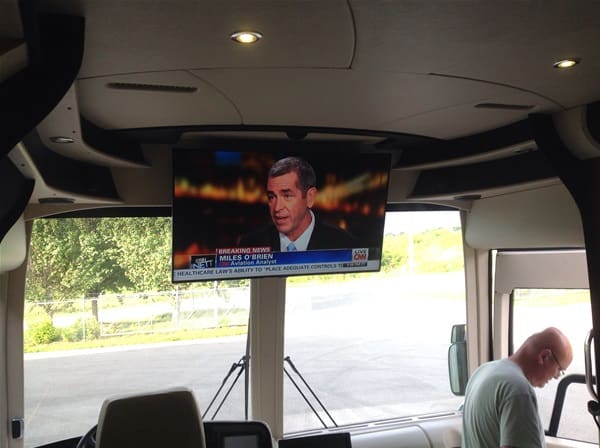
HD Sat dish installed and front and rear samsung led tvs
Tom replied 12 years, 3 months ago 9 Members · 11 Replies -
11 Replies
-

Gary, I will keep you posted. We should finish everything in the am. So far, so good! Jeff and his guys are great. The Crestron programmer is really sharp too. He has had many good ideas for changes to make the system more user friendly.
-
Post those ideas please, Mark. We are about to update ours and I’d like to get as many ideas as possible.
-
This is just a general observation about where we are today with our coaches.
When we had our first coach, which was very well equipped and had a lot of features we have today, one person could possess the skills and knowledge to repair, replace or upgrade anything on the coach. The systems were not so complex that a technician with average skills couldn’t trouble shoot or repair any problem. Further, there was almost nothing proprietary and if you had a WW Grainger catalog you could get a wide range of repair parts.
Those days are gone. As this thread shows we now require specialists or at the very least highly skilled technicians who can handle everything from diagnosing to upgrading the operating systems, to doing the more basic mechanical repairs.
This applies to the conversion as well as the coach itself.
-
Gary, the iPad upgrade is finished and works well. There is a learning curve when you change from the old remotes, but not too steep. It is light years ahead of the older Crestron remote we had in the bedroom, and seems to be very responsive and never drops the wi-fi signal like the last Crestron one we bought a couple of years ago.
My only real issue is I try to go too fast sometimes, but that is getting better the more I use it.
Karl, in the idea department, we cleaned out some icons that were no longer used, or have never been used. There were somethings that Legendary never implemented that showed up in a couple of places. They must have intended to do it, but never did. When setting up the screen layout on the iPads, we locked it into a portrait orientation so that the screens did not loose the spacing that was designed. I like that idea as it makes holding the iPad easier as well. We have also gotten some additional functionality and cleaned up some pages that were cluttered.
The other things that are great are the new tv’s and the HD dish setup. We have been spoiled by having HD at home and now we have it in the bus. The new Samsung tv’s are really bright and have a sharp picture. We kept the old Tracstar dish operational for a backup or if we want to use it in motion. It requires changing settings in the receivers and switching an a/b switch, but is easy enough.
Getting rid of the older plasma tv’s also saved us some weight and the new tv’s put out a LOT LESS heat and have a lower current demand. A win-win for sure.
It isn’t cheap, but what is on our coaches??
-
I also have ordered a couple of Launchport sleeves and charging bases. No wire plugging or unplugging to charge…it is induction and the iPad’s are held in place by some powerful magnets. Nice looking and nice not to have to plug in to charge. The bases stations have a rubber pad on the bottom to keep it from sliding around.
http://www.launchport.com/products if anyone is interested. I bought the sleeves direct from Launchport and the bases from Amazon as they were quite a bit cheaper there, but not the sleeves for some reason. They make stuff for the minis and the other ones as well.,
-
Mark,
Which iPad model did you use for his project? Are these iPads dedicated for your coach or can you use them to check your emails and surf the internet?
Thanks,
Reese
-
They are the iPad mini’s with retina display and are dedicated to the coach. We already had iPad airs for ourselves and will use those and our computers for email etc. If you wanted to, you could use them for other things, but I don’t want to.
-
Mark,
Thanks for the information about iPad mini’s and their usage in your Prevost. I sent you an email this morning.
Reese
-
Jon, despite being an aerospace engineer I am actually of your view. I look at a bus trip as if I were orbiting the earth with no way home other than my capsule. I would love to know that barring a catastrophic failure, I can manage to sleep, eat, #$%&, and watch TV assisted only by my toolchest, manuals, Lowes and Amazon, and I hate to say this, arrive back in time for work at the end.
-
Don’t misinterpret my views as being anti progress. Despite my flip phone I actually embrace almost all of the technology our coaches offer.
The latest chassis features are a perfect example. By going to multiplex the electrical system is actually simplified to a great extent and diagnosis of chassis problems is made somewhat easy with the message center providing clues.
I think the adaptive braking and stability control are two features that greatly enhance safety and I wish I had them. That kind of added complexity just makes a lot of sense.
But today’s systems require a different mindset from an owner compared to a coach 20 or 25 years old. It helps greatly to have either a way of reading DDEC or the other systems ranging from brakes to the transmission to the house, but in the absence of that ability, in today’s systems we need access to the technical people who have that ability.
BTW, I do like my Crestron. Not everything, but almost everything. So much so we are upgrading our house to have most of the features we have regarding video, audio and security operate via a touch pad. I have been told if I had a smart phone I could do that stuff on the phone, but I love my flip phone.
Log in to reply.