
-

There is a newer change schedule published now. A transmission with a retarder is severe duty, so 24 months or 50,000. Google it and it will come up/
On an unrelated nots how does one go about including a link via copy and paste?
-
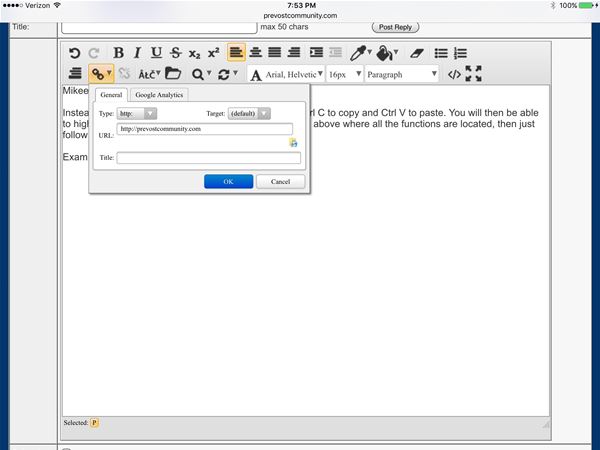
Copy and paste a link to the post. Highlight it. Then at the top the link icon will turn a darker color. Click on that and a drop down box will appear. Copy the link in that box and click on the OK box.
As to the service interval, Allison has a service calculator based on your annual coach usage. I presume I am running the average miles of a typical motor home owner and the service interval it suggested because I have a retarder was 150,000 miles or 4 years. I presume there are all kinds of service intervals, such as those listed on the PDF file I linked to above, but 4 years seems to be the norm unless the mileage exceeds 150,000 during that period.
http://www.allisontransmission.com/parts-service/fluid-filter-calculator
-
Below is the link to a thread on another forum where a contributor is the retired engineer that created the TES295 transmission fluid standard. He is also the co-owner of an oil analysis company.
Sign-up and ask away, its free.
http://www.irv2.com/forums/f125/former-allison-transmission-fluids-engineer-89293.html
-
Hi Jon,
I can copy the link to my clipboard, but when I try to paste it to the forum post when I right click insterad of the usual choices only aligh and format block appears. It seems to be a part of the forum as opposed to windows clipboard selections?
What am I missing
-
Mikee, follow the instructions I listed above. If nothing else just cut and paste the link and when the post appears Tom or I will make it a clickable link.
-
Mikee,
Instead of using copy and paste with your mouse, use Ctrl C to copy and Ctrl V to paste. You will then be able to highlight the link, which then lights up the chain picture above where all the functions are located, then just follow along.
Example: Prevost Community
Log in to reply.