Prevost Community Forums

Find answers, ask questions, and connect with our
Prevost Community around the world.

  • Technical Help-iPad to a Monitor/TV Screen

    Posted by Davy on September 23, 2019 at 12:09 am

    I need some technical help.

    This summer we added three cameras to help us keep an eye on the tent when we are set up in cities. I bought three Wyze Cams and I mount them in the tent after it is set up. The cameras hook up to the Wifi hot spot in the bus since we are parked right next to the tent.

    They send a push notification to my phone if someone walks under the tent. That allows us to get some sleep at night.

    I keep the cameras pulled up on my iPad when we are inside the bus. If my phone alerts me of movement, I can look immediately at the iPad and access the situation. A glance usually tells me if I need to go outside to tend to something or someone.

    This is a daytime screenshot of what I see this week in Mississippi.

    Night
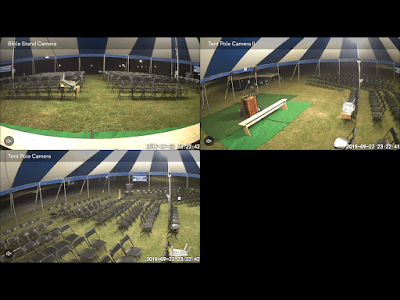
    I would like to see it all on a bigger screen. One thing that Wyze Cams can not do yet, is to display easily on a Windows computer.

    There must be a way I can get the camera feed from the iPad or iPhone to a TV screen or monitor? We removed the dinosaur TVs when we purchased the bus and have not replaced them. We are not TV watching people so there was no need. I would buy some kind of flat-screen for this purpose IF it can be done.

    Thank you in advance for your help.

    Davy

    Archived replied 7 years ago 4 Members · 4 Replies
  • 4 Replies
  • Archived

    Member
    September 23, 2019 at 6:38 am

    Apple tv (like roku) then you can send it easily to the tv screen…

  • Ronald

    Member
    September 23, 2019 at 8:57 am

    Ditto on the Apple TV.

  • Archived

    Member
    September 23, 2019 at 9:10 am

    Ok, Jeff and Tom. Thank you for your help. I am going to need you to hold my hand a bit here. Are we talking Apple TV, like walk into the store and by one or an App or what? Yes, I really am that uniformed. Walk me through this, please.

    I Googled iPhone/iPad to Apple TV and got this.

    iPhone to Apple TV via AirPlay
    1. Ensure that both the Apple TV and iOS device are on the same Wi-Fi network.
    2. On the iOS device, swipe up to reveal the Control Center.
    3. Tap the “AirPlay Mirroring” button.
    4. Select “Apple TV” from the list. …
    5. On your iOS device, enter the four-digit code that appears on your TV screen.

    That the right track?

    Davy

  • Larry & Diane

    Member
    September 23, 2019 at 11:31 am

    https://www.amazon.com/s?k=Apple+TV+4k

    Skip past the sponsored products at the top of the page.

Log in to reply.