
-
Tech Link
Posted by Tim on January 5, 2016 at 1:20 pmThis is probably an easy question Marathon owners,
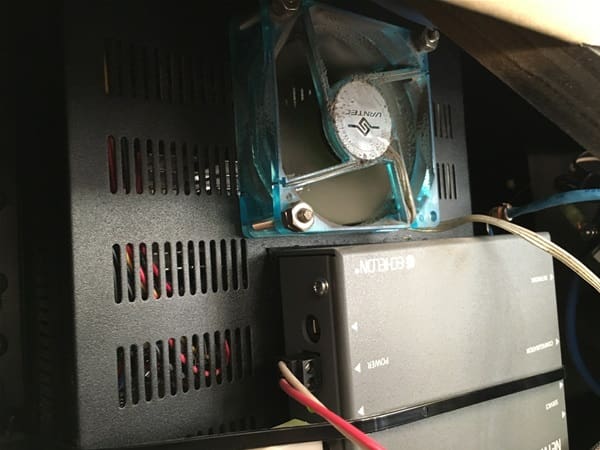
But the pic I attached is of what I think is the “tech link” computer, with a fan attached and some other box.
My question, since I’ve owned the bus, the fan for what I think is the tech link computer has been on 24/7. I removed the panel which is in the ceiling as you go from the cockpit to the salon.
I’m just trying to verify this is how Marathon sets this fan, which I assume they want this fan always on to protect the tech link from getting hot.
 Reagan replied 10 years, 10 months ago 5 Members · 10 Replies
 -
10 Replies
-

My techlink computer is located under the bed. It does not have an external fan. Maybe somebody added it to your coach and wired it without a thermostat?
-
That is correct Tim, it’s the Techlink Computer. Mine does not have a fan and doesn’t get real hot.
-
Well I figure it’s like a CPU which has its own fan which never shuts off …
I could disable it since it has it’s own power cord, but I’ll let it ride …
-
The computer is 12v, low voltage and makes very little heat
-
At the very least add that to the planned maintenance just like the inverters.
When we have fan cooled devices they can get incredibly filled with lint and dust. I periodically have opened the cover on my inverters and vacuumed or blew the dust that has accumulated. The dust can build up to a great extent and actually allow things to get warm.
-
When the computer failed Marathon FL felt it was caused by heat. When they replaced the computer they added the fan pictured on Tim’s post. On occasions I have silenced the fan when temperatures were below 60 degrees.
George
2006 Marathon -
Tim,
When you shut down the bus turning off the engine with key then hit the rocker (knife) switch does the fan stop ?
On our bus If I turn on dash radio or TV, I can hear fan motor come back on behind salon TV.
Is there a real need to keep that fan running 24/7 ?
I really don’t know. but I have been thinking about your post with fan running 24/7.
AL
-
Al,
No, the fan is on regardless of turning off the key and the rocker which you need to turn on to start the bus.
George,
How do you turn your fan off?
-
Just went out to the bus and hit the 12V pop breaker that I thought I always used and the fan stayed on???? Later on I will open the rear slide and try to trace the wires. The next time I go towards Tampa I will stop in at Marathon and ask Dr Joe why the fan no longer goes off when I disable the unmarked pop breakers.
Geo
2006 Marathon XLII
-
This is not exclusively a Marathon issue. On my last two Liberty coaches I had fans intended to keep inverters cool that were able to run all the time. The last coach the auxiliary inverter fans had a switch, that controlled the fans, but they were wired directly to the inverter 120V output. On the current coach I have an inverter bay fan that runs continuosly, and if there is a switch I haven’t found it.
I leave them on all the time. I know some have added a thermostat or manually control them.
Log in to reply.