
-
Tech Link Video
Posted by Tim on May 11, 2017 at 3:53 pmToday, between leaving our campsite and arriving at a new campsite, the Tech-Link video signal quit. All my systems are working, except my dash video screen to monitor my systems. Back-up camera works. I re-booted the system several times but video still doesn’t work.
It may be the video card in the tech link system, which is not a good thing, and I think I’d have to replace the whole unit since they don’t make my version anymore.
Any other thoughts?
AL replied 9 years, 5 months ago 8 Members · 13 Replies -
13 Replies
-

Check to see of the Techlink screens are visible on any of the TVs. If so, when this happened to me the problem was a video feed that had worked itself loose from the AV patch panel located in the ceiling above the driver seat. Drop your TV down and lower the panel next to it to access.
-
You’ll have to talk to Leon Tim.. I’ve replaced my video modulator twice and had Marathon repair my computer once and that was all due to no Techlink. I know how to diagnose mine, but won’t even attempt to suggest how to do yours. It’s really not all that complicated once you learn what makes it tic.
One thing you you can do to rule out the computer, run an rca cable out from the computer to any video device like a tv and see if you have video. If you do, then it’s likely downstream from there.
-
The problem could be the VGA video card or the external VGA to composite video converter or anything between those and your display if your system is set up like mine (1999). The converters are available online from $25 and up. For the video card you’d need to identify the PC bus and form factor (e.g. PCI).
Tom’s suggestion is good. You can connect a VGA display directly to the computer output. Most of the cheap low res LCDs have an extended VGA input. My system has a separate VGA to composite video converter. Connect its output directly to the RCA composite input of any video display to test.
Replacing the converter requires no software changes. The PCI graphics card might need SW changes unless it is just being used in the VGA compatibility mode.
Gerald
-
Thanks Guys,
What’s the video modulator, the grey box below the black box computer?
I assume I should test with an RCA cord where the yellow composite is currently plugged into the computer.
I’ll be in Oregon for a build in August and planned on stopping by Marathon for a factory tour. May stay an extra day to get this resolved if I can’t figure it out.
If not, guess I’ll be dumping every couple days to avoid any overflow issues …
-
Tim,
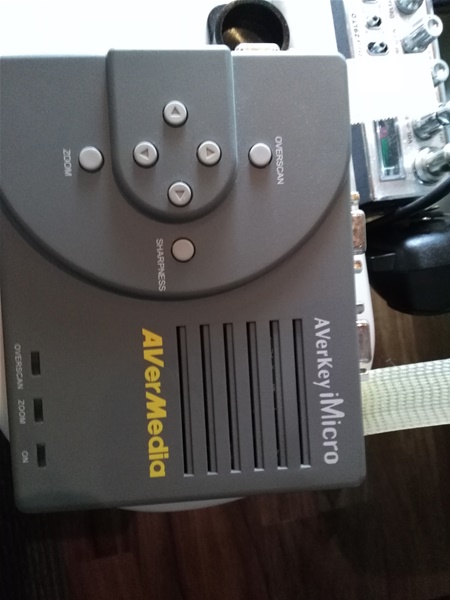
We have had intermittent problems with our video display. Our coach has “video 1 and video 2” which toggle
from the “video” button on the dash. Our tech link display is on video 1. In one of our front cabinets, is the device
pictured bellow. I am not sure what it does, but whenever ours stopped showing on the display, I would make sure the input, output, and power are connected properly and the display starts working again. Good luck.
-
Actually,
I got the video to play on my TV and then on my dash.
I think it may be a cable switching box and another small cable electrical box. One is from Radio Shack and I’m not sure the manufacturer of the other one. Pics of both …


Since Radio Shack is out of business, I need to locate a different electrical switching mechanism with one input and multiple outputs. If anyone has replaced this unit, let me know.
It’s working as is, but I can only monitor it thru the dash monitor or TV monitor, but not at the same time and I need to change the cables out. For now, I’ll keep it on the dash monitor.
1984 96" with 8V92TA
(remodeled Liberty Coach)
Greenwood, MO -
Tim,
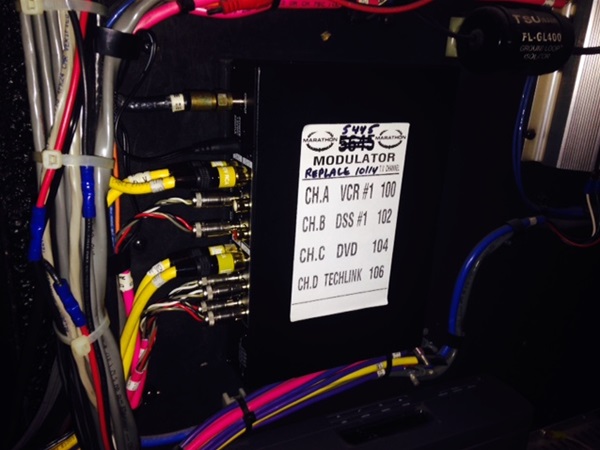
This is the modulator I have changed twice in 3 years. When it fails on my coach, I have the input from the computer, but no output to any of the tv’s or dash monitor. Mine is in the rear walk in closet. It’s available online and think it was less than 200 bucks.
-
I don’t see a box like that in my rear closet or above the driver’s seat.
You must have an upgraded tech-link unit.
I think I have a number of components/cables which I don’t need anymore, so eventually I’d like to clean them all out. Just don’t want to toss anything that’s actually working something 🙂
-
Tim,
Not sure if this will help or not… I have an 07 but my tech link stuff is under the bed. There is a video DA that splits the signal from the PC to the various screens… Mine went out and was an easy fix. Tom’s suggestion is the most logical place to start if you can find the PC and the associated stuff.
If that doesn’t work give Leon a call!
Bill
-
Tim,
We had the same thing happen. It turned out to be the power supply to the TechLink. Marathon apparently uses two transformers; 120V to 12V, then to 5.5V. If you follow the power to the Techlink, you should be able to trace it. Turns out the final connector is the same as my Samsung phone, so found out after the fact I could have used my Samsung charge cord to power the Techlink. -
Tim,
The unit that we have is still available. Here’s a link for it from Amazon for $80.99.
https://www.amazon.com/AVermedia-Key-Micro-Scan-Converter/dp/B00006B7F7
-
Thanks John,
I think I figured it out. It’s the radio shack video amplifier. For some reason, the “input” is not working, but the outputs are working so I changed my tech-link cable to one of the outputs and it worked, but again only on my dash and not TV.
I believe I can get one of these generic video amplifiers through Amazon.
One more question Boys,
My back-up camera takes a while to warm up and yesterday while traveling, I noticed that once in a while the video feed “scrolls” up. I see that tech link controls the back-up camera, but not sure if this could be a separate electronic module that I may need to replace. However, it may also be the video amplifier that’s bad and is not sending a strong signal to the back-up camera.
Any other thoughts?
Log in to reply.