
-
Tech Link Monitor
Posted by Tim on February 14, 2016 at 3:17 pmOur tech link monitor on the driver’s dash is not populating the first leg of “AC Volts”. It just shows “0”. Right below that it does show “AC AMPS”. The inverters show both legs of AC are working, and underneath the bus at the main “On/Off” breaker it shows all four green lights. Everything works.
Is there a way to re-set the Tech Link monitor that may correct the “0” Volts to accruately show the voltage?
Archived replied 10 years, 8 months ago 10 Members · 17 Replies -
17 Replies
-

Reboot the computer Tim, if you can’t do that just turn off/on the house power.
-
How do I reboot the computer? Also, do I just turn on/off the Main/Aux breakers to the house to reboot the power to the house or is there one main switch to do this?
-
Tim,
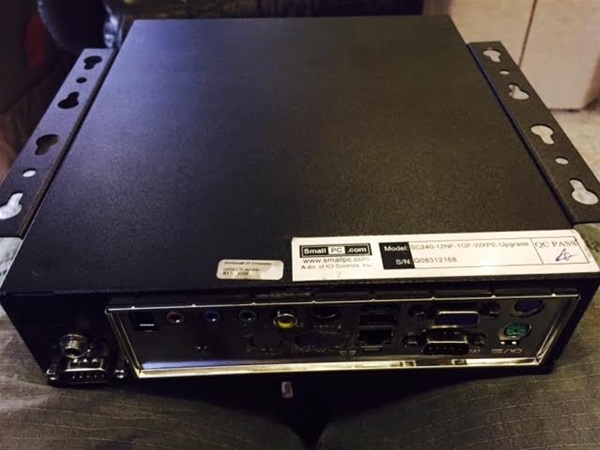
On My bus the computer is under the bed. you if you can’t find the switch you can pull the cord out of the back or cycle the power strip that feeds the pc and the video amp splitter. If memory serves there is a windows logo on the box… it’s a black box smaller than a typical PC. Hope that helps.Bill
-
Another way to reboot the system is disconnect shore power. Then go through your start up procedure for your generator letting it engage the bus. Run a couple of minutes, shut down, re-connect shore power.
Hopefully, your problem is cured.
AL
-
Al, Where’s your Tech Link PC located? Mine is not under the bed.
-
Tim,
My tech link is on an inverter circuit so doing what Al suggests doesn’t reset mine. But I am pretty sure that kiling the AV master circuit which resets the creston and all that will also reset the techlink… so if you can’t find it you might try that. If nothing else works give Leon at Marathon a call and he will know where yours is and how to reset it.
Good luck!
Bill -
Truk …tells me behind the salon TV.
BTW…where is Truk ? We have buses to fix.
-
Tim,
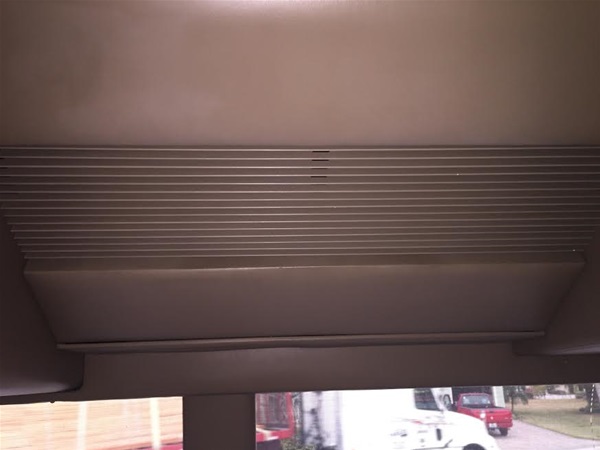
Your computer is 12v and if like mine, is in the overhead center behind the removable panel. All you have to do is unplug the power, then plug it back in. The other easy way is to turn off your 12 and 24 volt house power, then turn it back on. It will take some time for everything to come back up.
If that doesn’t work, a call to Leon will be needed.
-
From a Royale’s wiring you would disconnect shore power, set investors to off and for good measure flip the 12v disconnect switch. This gives me a “dead” bus, with exception of the chassis side. Then reverse the steps to restore power.
Oh, and make sure the auto-gen is disengaged.
-
I know where that little black box is, but one tech at Marathon told me that is just the sub-computer to the main system. I did unplug the “tech link out” cable and the monitor went blank but it did not reset the computer. May have to call Leon later. I also tried to reset my 12v system & turned of every 12v breaker, then turned them back on but it did not reset. May not have done it right though since the system came right back up. Will go outside and try to turn off the inverters and breakers outside after quite hours.
-
Got it Boys! Had to turn everything off outside but that reboot the main computer. Now I want to locate where the main computer is in the bus so next time I can do it from inside. Thanks again!
-
Here’s where mine is located Tim, center above driver area. When you find it, all you have to do is remove the power to re-boot. I assume you found you 12 and 24v house cut-off in the small locked bay door, rear curb side.
-
I do not know anything about conversions other than Liberty, but with the ever sensitive electronics and systems I would NOT kill power to the coach until I knew if there was a required sequence to removing or restoring power. I do know it is possible to destroy some inverters if they have 120V imput, but you shut off their ability to sense DC voltage. Some inverters see that as a dead battery and then the inverter tries to charge that battery.
-
Standard procedure in a Marathon as directed by Leon. Only thing needed is if you had the autostart active when cutting 12/24 power, you have to reset it once power is back.
-
Well Tom,
Your pic looks like the same one I have in the same location. That’s the one I discussed earlier where there is a fan on 24/7. However, I never found the power cord to that unit. I unpluged the cords I found, but none of them were the power cord. I did not take out the unit though, but I would think I could re-boot it without removing it from the overhead storage.
I’ll buy you a cold one next week if you show me the secret!
Log in to reply.