
-
Marathon Tech-Link gone
Posted by Chris on January 19, 2015 at 2:36 amEssentially a newbie (first Prevost 4 months now). Went out to work on the bus today. Went to check in the elec/waste compartment and noticed the tech link screen was blank. Went into the coach and attempted to bring the Tech-Link screens up on the TV and drivers screen. Blank, just says AV-1. Coach is a 2007 Marathon H3 with the crestron system. All the other A/V stuff works fine. Is there an on/off switch for the tech link or a reset switch? Where does the tech link live? Seems like something has been turned off that I am missing. Thanks for any help or thoughts.
Chris
Archived replied 8 years, 4 months ago 13 Members · 23 Replies -
23 Replies
-

I had that happen to my 2001 Marathon and the computer for the teclink was bad the sell them at Staples for about $75.
-
You may need to re-boot the computer. My Techlink box is under the bed, behind a panel below the headboard. It is supplied power via a pin plug on the left side of the box. Unplug the box, wait a few seconds, and plug back in.
It will take a few minutes for the screens to restore, and several more minutes for the data (holding tank status, inverter status, etc.) to get accurate.
-
Re boot is a good idea but for some reason my brain is telling me AV1 is not the right input for Techlink. Before you re boot you might want to switch thru your video functions.
Later
bv -

Chris,
My computer is located above the driver area, it was hard to find since Marathon couldn’t remember were it was located. Mine has also been upgraded from the original computer and replaced with an industrial computer for smallpc.com. The replacement cost on mine is around 8950 and it looks like this:
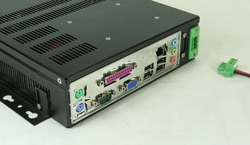
If you can locate the computer, removing the power and re-booting may solve your problem. Also, check the video out cable to be sure it hasn’t come loose, mine came completely out. Once rebooted, it will take some time for it to come back to life. If you can’t find the computer, power the bus down then back up and that should reset the Techlink and computer.
I don’t have Crestron, so that may add another layer of problem solving.
-
I agre with Tom. Try rebooting the computer by unplugging the power supply, waiting 30 seconds, and plugging it back in. My unit was replaced 3 or 4 years ago as well. Ours is located under the bed and in a compartment against the outside wall.
-
You might call Leon at Marathon tech support in Coburg, Ore. He’s helped me with Tech link issues before both over the phone and in the shop.
-
Bernie is on the right path. If the video is active on the dash you loose the teck-link window.
-
I would REALLY hesitate to cut the power on the computer. That happened to us as a result of the SurePower recall, and it blew up the mini computer. Best bet would be to call Marathon tech support. They’ve been very responsive and helpful to us.
-
I was instructed to cut the power to the computer by Leon and it worked, re-boot.
-
Deleted User
Deleted UserMarch 1, 2015 at 4:04 pmI had a similar problem. When my TechLink failed, it was the video distribution strip that lies next to the TechLink computer. It was an older Xantech 8-channel device. There was visible burning on its circuit board. I replaced it with an ordinary car-type video distribution amp with 4 outputs for about $25 and was back in business!
-
Floyd wrote: “There was visible burning on its circuit board. I replaced it with an ordinary car-type video distribution amp with 4 outputs for about $25 and was back in business!”
How in the world did you know even what that thing was and how to replace it? I thought I was pretty worldly have never heard of a “video distribution amp”! Where do you find things like that?
-
Thanks for all the help. Have been out of town off and on for several weeks. Called Marathon and they pointed me to the computer under the bed. They said to unplug it and reboot. If that did not fix it I could send it back to be replaced or rebuilt for $1000+. Did the reboot, no help. Then for kicks I tapped on the hard drive cover sharply, plugged it back in and it worked fine. HD probably close to going but Marathon suggested using it till it dies since it is so expensive to fix and i might not have another problem. Marathon also said this was a common problem with the system from the late 2000s. Also found the computer was not fastened down securely so vibration probably has contributed to the problem.
-
Chris,
Please add a signature with year and converter to your post by going to “Profile.”
My understanding is there is an alternative to purchase Tech Link items.

Log in to reply.