
-
Map Entry Instructions
Compliments of Ronald…
HOW TO add information to PC Users Map
PC Users Map is a member driven interactive map of places to visit or stay and things to do.
PC Users Map requires active participation of all PC Community members.
This is a resource fed and kept alive by the PC membership. It will
succeed and strive when PC members contribute some of their knowledge
and it will fail if the members do not do their part to help with
populating this resource.Here below is a description of how to go about adding information to PC Users Map.
These instructions are being supported by actual screen prints to help you along the way, step by step.
After you have logged-in to PC Community using your user name and password, you see the following screen.

This is where you would normally select a forum heading to read the latest posts and replies.
Right above the forum headings is a line of 5 small square blue icons
starting with the NAPA auto parts store icon on the left and ending
with the PC Users Maps Icon on the right.Click on the PC Users Map icon

and you will be shown the following map view.

This is the default map view titled PC DISCOUNT FUEL STOP. However,
it provides you with an overview of ALL map entries. This view is not
very useful because the screen is full of icons fighting for space.However, you do have the option to filter this view by utilizing the SELECT CATEGORY drop-down box.

Select the category you want to look at and click on the SUBMIT button.
This will create the filtered view of your choice.
For example, select the NEAT PLACES TO VISIT category and you will see the following screen.

This category should be choke full with entries of places you enjoyed
visiting and would recommend to all of your fellow bus friends here on
Prevost Community.Click on any of the current entries and a new window will pop-up with
all of the particulars of that entry. All the information entered on
this form is done freestyle. Whatever you type will be shown here,
including all the typos.
All of that should be self-explanatory.
When you are ready to share your secrets with the rest of us, you
have to click on the bolded line ADD YOU OWN MAP ITEM. This link will
take you to the following screen.
One detail that will be very important is the LAT and LON (Latitude
and Longitude), a nautical term which determines your precise position
on earth. More about this later.Please complete the above form by filling in all information that is
available about the place you would like to share with us. You may have
to dig out a business card for complete details or do a Google search or
visit their website to extract all needed information. Please be
assured that all of us will appreciate your kind efforts!Getting back to the Lat / Lon information, you will note that there
is a blue link named FIND LAT / LONG and when you click this link you
will open a new web page that looks like this.
Enter the address of your place and click on FIN LAT / LONG. The
result will be shown in the 2 boxes to the left marked LATITUDE and
LONGITUDE.
The next step is a little tricky because you have to COPY AND PASTE the Lat / Lon numbers back into PC USERS MAP.
Almost done … !
Next select the category where you wish your submission to be displayed.
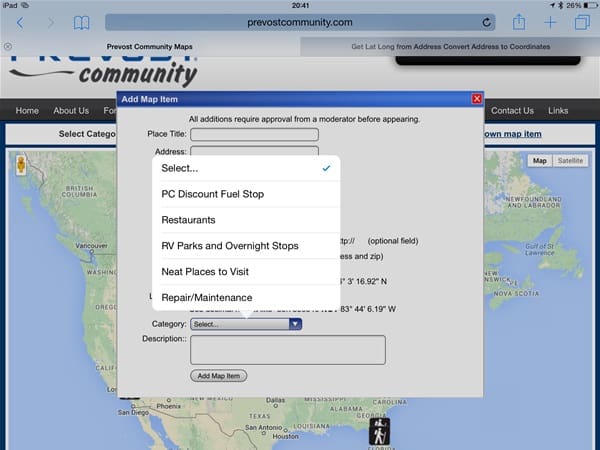
Finally, the really fun part, please give a good description of the
place and tell us what is interesting about and why we should go there.
If you are a person of few words, no worries. Any comment will be highly
appreciated!The last and final step is to click on the ADD MAP ITEM button at the bottom of the form.
If your form is complete, you will receive an acknowledgment
indicating that your submission was received and will be reviewed and
more than likely approved by you know who.
Sorry, there were no replies found.
Log in to reply.