
-

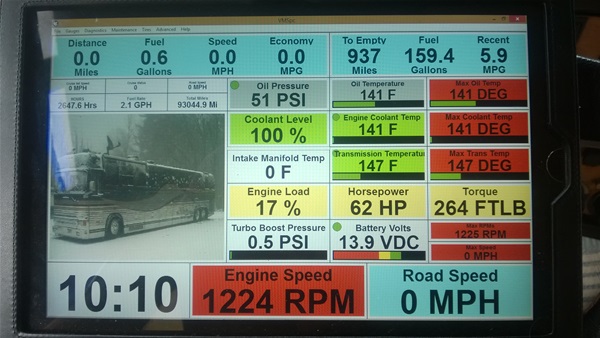
Silverleaf doesn’t work with Ipads, with their VMSpc you’re able to use a USB to a tablet. It will tell you a lot about your engine, how many gals of fuel it has used since new, how many miles, etc etc. I have mine on a system that allows me to get the information via wifi, so any PC in the coach can log onto the engines data stream. Otherwise USB cable to PC works great.
-
Silverleaf created VMS Air for the iPad but it is not a good interface. Hopefully they will update it to look more like the PC screen. I have a VMS 240CL that gives lots of great info, just not in that pretty package. I have it for my other bus. I need to order another pigtail so I can hook it up in the XL too.
-
One thing I learned from flying was that having a lot o0f information was good, but it can be very distracting.
It’s bad enough when owners are using their cell phones while they drive, or watching TV. Adding another distraction can contribute to an accident.
-
Dale the ipad option is a huge disappointment, doesn’t really work from what people tell me. If someone has any luck with the use of it please let me know, I do like the size of the ipad. Silverleaf indicated they really aren’t doing a lot with it, maybe that will change but I doubt it.
Jon what is nice about the silverleaf, and others, is that you can set alarm points on all of the different data points and unless you get an alarm there is no worries, which I like.
After a little use it is easier to use than gauges, at a glance you can quickly take in a lot of info, much safer than going from gauge to gauge. I agree with too much info, you can choose what to put on your screen and what size.
I do like the fact that I can tell what the engine is burning fuel wise, not including the fuel being used for hot water, heating etc, gives you a very acurate means of measurement. Knowing your torque and HP output at any given moment is useful too. Knowing the average mpg since new, total gals used is something that you just can’t get through other methods (as easy). As Silverleaf advertises, knowledge is horsepower. (no I do not work for them, just enjoy their product)
You can easily get live info off of the engines computer from anywhere in the world if you so desire, I don’t have that need tho. The logs are nice if you want to study someone else that might be driving your rig, max rpm, speed etc etc.
The Pro Driver was discontinued years ago because it was obsolete, limited in what it could do compared to everything else available.
And what is really nice is for the drivers that are not as skilled as others I just unplug the USB, remove display, and there is all the gauges all properly working. One thing I have noticed is that the gauge oil pressure is incorrect whereas the computer reading is right on, even tho I have changed sending units etc.
-
As you may have already figured out I am a steam gauge guy and very comfortable with a quick scan. I know exactly what my eyes are supposed to see and can get along just fine without a digital display.
When I want real data and lots of it I plug in my Pro-link.
Maybe that comes from the skills in scanning the airplane instrument panel. But I do know when I put in the digital engine monitor in the plane I had to train myself to quit looking at it because the raw data would litererally draw my attention from the important stuff.
But then again I have a rotary dial cell phone with no voice mail, text. GPS or camera. And I get along just fine. Sometimes I actually turn it on.
-
Good information Dale & Lee, I had Silverleaf in a couple plastic coaches many moons ago and liked it. It was the VMS 120, I think, and dash mounted. Having this information on an Ipad would be great, but sounds like it not that good.
-
Peter, Did you install those blue digital gauges? Mine are terrible hard for me to see also…..
Steve
-
I bought all the gauges just before I sold it and did not put them in but they were not that bad
-
There are a lot of LED gauge bulbs here : http://www.superbrightleds.com/cat/instrument-cluster-gauge/
The site also lists the lumens of each bulb and that might help to determine the brightness you need.


Log in to reply.