
-
How do you get the TV off the wall??
Posted by Jerry on June 30, 2017 at 8:23 pmAny of you Vantare/Featherlite owners ever removed the bedroom TV off the wall that’s mounted like mine in the pictures below? The fit of all the trim is so tight, I hate to pry on too much. I did remove the fabric on the left side, but did not reveal anything ?


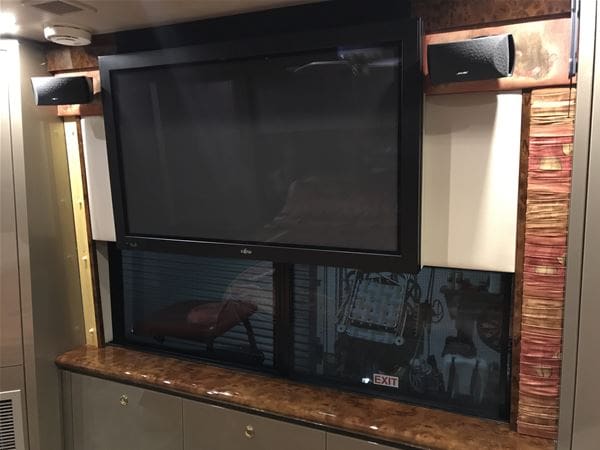
thanks
Archived replied 9 years, 3 months ago 5 Members · 7 Replies -
7 Replies
-

Sorry Jerry, Not much help but maybe the coach converter could tell you. But then most of them do not want to give their trade secret. I asked one time for help and was told if they tell me they would have to shoot me. Never mine I’ll live with it!!! lol
-
Took me a while to figure out too. One of our TVs just hangs on a horizontal mount. To prevent falling off or lifting off, there is a small plastic cover on the bottom of the TV that hides two screws. Once you take those out, the TV just lifts off. The cover is where the TV stand usually goes when not mounted to a wall.
Since your TV is mounted over the window, can you reach up behind the TV where the blinds go and check for bolts/nuts?
Gerald
-
Gerald,
No access underneath, it seems to have a 1/4″ thick plate that spans the window behind the TV that it’s attached to. I’m wondering it they took the window out to have access behind the TV. It’s acually a monitor, and it cuts off after about 20 min of use. I can take power away, turn it back on, and it will work another 20 min before the screen goes blank again.
Plan to update them, but until I can, I would like to fix this one, or replace it.
I have not tried removing the shade yet, I will try that. thanks
-
Your TV shutting off after 20 minutes, It sounds like you have the sleep timer on. There should be an option in the configuration/setup menu to turn it off.
Just speculating but if I had to mount a flat panel TV over a window, I’d screw studs into the four standard mounting holes in the back of the TV, drill matching four holes into the backing plate that covers the window and reach up behind the backing plate where the blind is to fasten the TV with nuts and washers.
Gerald
1984 96" with 8V92TA
(remodeled Liberty Coach)
Greenwood, MO -
Gerald,
It’s not exactly 20 min, sometimes more or less. It’s something getting hot and shutting picture off, the screen still says “Video”.
I’ve Googled it, and it says PCB board going bad, but got to get the TV down first.
-
Jerry,
Some of the TV mounts have a small lever that locks the unit into place after sliding the TV onto the wall mount portion of the mount. It will be on the TV portion of the slide mount. They only move about 1/2″ and have a small tab that will lift up towards the ceiling. Try to video the rear of the unit with Your smart phone or get a small mirror on an extension to look for the locking tab. After you slide it, Just lift and pull off of the mount.Safe travels,
Rocky -
Rocky, good idea, I’ll try that
1984 96" with 8V92TA
(remodeled Liberty Coach)
Greenwood, MO
Log in to reply.