Prevost Community Forums

Find answers, ask questions, and connect with our
Prevost Community around the world.

  • Can not view pictures of “for sale”

    Posted by Jim on June 25, 2016 at 8:24 am

    Not sure where to ask/post this question.

    Just switched to “Google Chrome” form Internet Explorer, I no longer get the pictures when viewing the ads.

    When I click on slide show/ scroll, I get a brief flash of the jpg numbers then blank screen.

    any suggestions?

    Thanks, Jim Brown

    Archived replied 10 years, 2 months ago 6 Members · 5 Replies
  • 5 Replies
  • Gerald

    Member
    June 25, 2016 at 9:25 am

    Jim,

    There is no problem on our end, so here’s a suggestion…

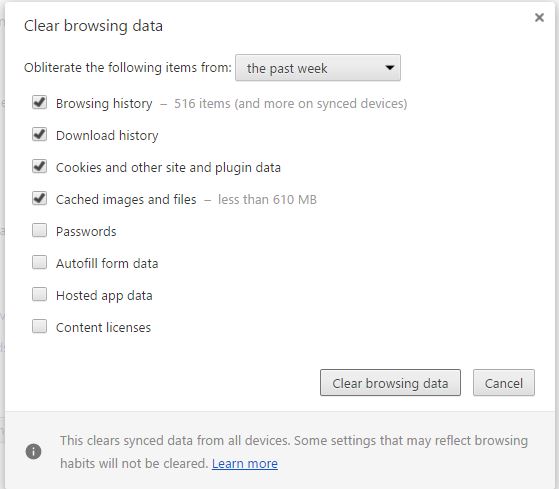
    In Chrome, click on settings, then advanced, then privacy and clear browsing data.

    Then sign out and back in. If this doesn’t fix the problem, it’s beyond my pay grade.

  • Chris

    Member
    June 27, 2016 at 11:48 pm

    I have had the same problem….tried everything and just now read an article about removing AdBlocker and it worked.

  • Archived

    Member
    June 28, 2016 at 12:06 pm

    I turned off adblock for that page. but no help.

  • victor

    Member
    June 28, 2016 at 1:21 pm

    Jim,

    I logged in as you, using Google Chrome and had no issues seeing photos of coaches for sale. I am on a PC.

    If you have tried all the suggested fixes let us know and give us detailed information of the browser (if you switch from Chrome), type computer, etc. We will see if the web guru has any ideas, but the issue is not at our end.

  • Dale

    Member
    June 28, 2016 at 3:45 pm

    Jon and all thanks for the help. I had disabeled adblock on the “forsale page” but not the forum/ whole site.

    all is well. thanks again.

Log in to reply.