
-
Pressure Pro Pulse On-Off
Posted by Jimmy on May 7, 2017 at 9:30 amI upgraded to the Pressure Pro Pulse. The coach is stationary in South Florida for months at a time. There is no need for the Pressure Pro Pulse to be on but I can’t seem to turn it off. And the unit is constantly beeping, probably because it can’t read 2 of the tires. I turn it off and it stays off for a few minutes and back on again and continually beeping. ETLC has it hard wired into the system. And the Pressure Pro Pulse manual is of no help. Any ideas how to turn the system off and stop the beeping until I’m ready to drive again?
Archived replied 9 years, 5 months ago 11 Members · 25 Replies -
25 Replies
-

Jimmie,
I installed mine on a “key on” circuit. There is an “off” button in the lower left face of the unit, but I never tried to see if it turns it off until I want it back on because when my key is off there is no power to it.
I don’t know why it would be on a circuit that is hot all the time.
On your coach in the steer compartment to the right hand side of the electrical box there is a plastic covered set of 4 terminals which are 12 volt key on, 12 volt key off (hot all the time), 24 volt key on and 24 volt key off. If that is where Jeff connected to the power for the Pulse, just move it to the appropriate other terminal.
-

Jon…yes, I’ve been turning that “off” button on the unit itself for the past 4 months. The unit keeps coming back on.
I have not taken your training course yet nor am I automotively or mechanically inclined. What and where exactly is a steer compartment on an H? I’m assuming you mean the fuse compartment bay right under the driver???
Thank you for your help and patience.
-
Yes, the area right under the driver’s left elbow. That should be where you will find the terminals for the various power souces.
-

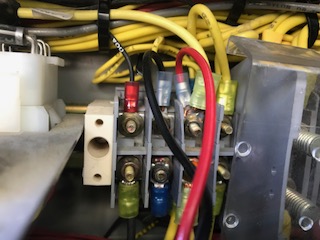
To the right is the plastic cover that Jon refers to. It’s full of heavier guage wires. The black and red wires hooked to terminals lead the other way to a dead end….the lighter holster which I assume is for the Pressure Pro…maybe it’s for the old Pressure Pro…not the new Pulse.??? But the other end stops with the female lighter socket.
If I were to unhook the red and black wire, the space is really tight so it looks like I need a small nut driver to…by chance does anyone know what size I should go and buy?
I’m totally lost. I don’t see any other wires that might indicate it’s for the Pressure Pro Plus. What am I looking for? And there are no markings for 12V or 24V. And the beeping continues. The sound is maddening and seems to be getting more steady and constant.
Any help would be appreciated. Thank you.
-
Jimmy wrote: “the space is really tight so it looks like I need a small nut driver to…by chance does anyone know what size I should go and buy?”
Go and buy a set; start building a collection. Sears/Craftsman has a nice set in a zippered case. Has both metric and standard sizes.
-
I’m really reluctant to suggest you go much further if you are not sure of what you are doing.
I would feel comfotable if you could verify the Pulse power source. Follow the power cord from the Pulse to its end. If it plugs into a socket like a lighter socket, follow its path to where it gets power. If the source of power is at one of the terminals I decribed earlier verify it is hot all the time and determine its voltage. If you don’t own a multi=tester or know how to use one get assistance.
If you find the power source terminal to be hot, locate the one with the same voltage, but that is only hot when the key is on. I don’t have an H so I cannot be specific. But like an earlier post where I cautioned Dick to not mess with the electric unless he is sure of what he is doing, I am going to offer you the same advice.
-
I purchased my unit at ETLC also. Mine is wired the same way. He simple solution is to remove the display unit from the holder Jeff built and unplug the power in the back. I do this every time I park my coach for several weeks at a time.
Love my pressure pro. If you find a better fix please post it.
-
As Hugh stated I would unplug it at the unit itself….it will come right out of the little box it is in….
-
Hugh, the better fix is to power the unit through a key on circuit. The downside is you will not get instant readings and have to wait after it wakes up to read all the sensors and that may take as much as 5 minutes.
-
My vintage has an ignition master switch, so my GPS and Pulse is on that circuit.
-
Ah, that works. ETLC built a beautiful leather box to match my dashboard and the Pressure Pro Pulse appeared to be built right in. Indeed, it slid right out. Unplugged and no more beeping. Thank you all.
-
Isn’t that kinda Mickey Mouse having to do that every time? It should be a 1/2 hour job at the most to go from a hot terminal to a key on terminal and the issue is resolved.
-
Jon… I plan on taking the coach to Disneyland Tennessee so Jeff can fix it while I mingle with Goofy and Daffy who I hear are hanging out there.
-
Out of curiosity how do you get the transmittert onto the stem that goes into the wheel rim? I’ve never seen a stem pointing into a rim like that before, what’s the reason for it and can you in fact get a transmitter on it?
Also do you use the theft protection devise that’s available for the transmitter?
Harry
-
HJ,
Are you referring to the exterior drive tires? If so, just unscrew the nut securing the valve stem and turn turn it so you can not only put a sensor on it, but also air it up.
Or, if you’re referring to the interior drive tires, those should be facing out, but you will need Tom’s cheap, but effective, solution using PVC as a wrench to get your sensors on those tires.
Log in to reply.